Thursday, June 11, 2009

App Store pricing model defies logic

In his column dated June 11, 2009, David Pogue detailed the pricing of Mac OS X "Snow Leopard" and suggests that Apple may be taking a page from the App Store playbook.
What do you suppose is the difference between the pricing model of the App Store and more traditional pricing models?
I recall reading an interview with an Apple ][ developer from the 1980s. I'm afraid in ten minutes of searching Google I can't find the article anymore.
His company was developing one of the first spell-checkers for the Apple -- it was a revolutionary product at the time. There were other competitors in the market, but his software was faster and fit into less memory: thousands of English words stored in just a few kilobytes. (Back then an Apple computer had only 64K of memory.) His product was also cheaper than the others. They sold very few copies.
So they raised the price of the software and sold more copies! Astonished, they raised the price again -- now more in line with their competitors -- and sold even more!
Price is a reflection of perceived value and quality. With no other quantifiable measures of quality available to consumers (remember, they're just reading ad copy or a box cover), an estimation of a product's value and quality is based on price. All other things being apparently equal, something that costs more than another must be of higher quality.
How does this play out in the App Store, where something that costs less than another sells better?

Apple seeks wrath of the Author's Guild


MacRumors today posted a few screenshots of the upcoming Mac OS X Snow Leopard release. One of the features in particular grabbed my attention: automatic text to speech with conversion to an iTunes track.
Whoa! That's a shot across the bow to the Author's Guild which in February tried to seek an injunction against the Amazon Kindle 2 for its text-to-speech feature. Amazon has since bowed to the pressure and has started to disable TTS on some of its offerings.
This Snow Leopard feature creates new content from existing content -- the very thing that the Author's Guild objects to. With this feature you could buy an e-book, convert it to an audio track, and listen to it on your iPod.
I wonder how the quality of Apple's TTS compares to the Kindle's.

Wednesday, March 11, 2009

History of Programming

Programming in the 1980s

        end;
     end;
    end;
   end;
end.

Programming in the 1990s

    }
   }
  }
 }
}

Programming in the 2000s

    </div>
   </div>
  </div>
 </div>
</div>

Tuesday, January 20, 2009

How to Shop Online and Stay Out of Trouble

So-called Internet experts will tell you that to avoid trouble when shopping online, you should only buy from reputable sources. But without prior experience, how do you know who the reputable dealers are?

This is my personal list of online resellers who won't try to scam you, they charge reasonable prices, and offer good-quality merchandise.

Computer Parts


For things like hard drives, mainboards, peripherals, and accessories, look no further than NewEgg. They've been in business for over twenty years (formerly Egghead Software). Prices are always competitive, although not necessarily the lowest. Shipping charges are never excessive and often free. Every product can be reviewed by users, so it's easy to find the high-quality stuff.

One should never pass up checking Amazon.com, just in case they have it for less than NewEgg.

Photographic Gear


This is a tricky market to navigate. There are literally hundreds of fly-by-night and bait-and-switch shops luring you with unbelievably low prices, only to gouge you later with exorbinant shipping, overpriced accessories, and dubious warranties. Check the website resellerratings.com before you buy electronics from any online seller.

Or save yourself the trouble and buy from one of these two retailers:

B&H Photo and Video. One of the few photographic stores in New York that is not a scam. Professionals shop here. They have a massive brick-and-mortar store in New York with knowledgeable staff. Prices always beat your local camera store, though be sure to factor in shipping to make sure it's worth it.

There's always trusty Amazon.com, too. They stock all the popular cameras and accessories, often at prices that beat even B&H. Some of their stuff is cross-listed with B&H competitor Adorama, whose prices and service are just a tiny notch lower than B&H. I have no qualms about ordering from Adorama.

Cables


Everyone needs cables, whether it's to hook up your new Blu-Ray player to an HDTV or simply have a spare USB cable laying around. Want to know a secret? You don't have to spend $50 on an HDMI cable or $20 on a USB cable from your local electronics chain store. You can get cables of equal or higher quality from Monoprice at a fraction of the price. Don't fall for the overpriced brand names such as Monster Cable; generic ones of high-quality construction will do just as well. Here's a sample of what Monoprice has to offer:

Premium 24AWG 6 ft. HDMI 1.3a cable: $9.98
USB 2.0 6 ft. cable: $0.94
10 ft. Category 5e network cable: $1.28

Business Cards, Flyers, Postcards


Want high-quality, four-color, press-printed business cards on thick cardstock instead of photocopied cards from your local office supply store? Check out America's Printer. Based in Los Angeles, America's Printer will accept your camera-ready documents (PDF, JPEG, InDesign, Illustrator) and run them on Heidelberg presses with a matte or glossy finisg. One thousand cards for under $40. Do keep in mind that you're expected to deliver files that exactly meet their specifications. They will not adjust your files or otherwise hold your hand in any way. You get what you ordered, whether or not it's what you wanted.

A couple of caveats: First, although they accept electronic upload of files, the job order has to be filled out by hand and faxed in. I don't know why. Second, it will take a couple of days from the time you submit your job to when it runs on the press. Even if you pay for overnight shipping, it will take at least 4-5 business days to receive your job. Finally, as with any third-party vendor, expect that your order will be messed up somehow and factor in extra time to re-run the job. They'll re-do it for free, but you'll lose about a week. On the other hand, you may end up with two sets for the price of one.

Photographic Printing


The inkjet printer manufacturers have spent millions to convince you that you need to print out your digital photos on one of their products. You know that the ink costs more than Dom Perignon champagne, right? Why pay that kind of money when you could get beautiful prints at a fraction of the price from your local Costco? There are dozens of online photo printing sites, such as Shutterfly and Photoshelter, but if you have a Costco nearby, there's no reason to go elsewhere. (OK, there's one; see below.) Costco will allow you to upload your files using a web browser and choose the print size. ICC color profiles of their Noritsu printers are available for fine control over exact color matching. About an hour later, pick them up at the one-hour photo desk. Prints are cheap: 17 cents for 4x6 and $2.00 for 8x10.

But when you want very high quality, such as printing a photo for exhibition, a wedding, or a gift, go to White House Custom Colour. They're a bit more expensive that Costco, but what you get is calibrated color prints on premium-quality Kodak Professional Crystal Archive paper. Prints can be as small as wallet-size and as large as 30x45, including huge panoramics. Your order will be carefully packaged in a plastic bag protected by layers and layers of cardboard and shipped to you via 2-day UPS for free. They can even bind your photos into books and matting/framing service is available. But as with any vendor geared toward professionals, they won't hold your hand. You're expected to know what ICC Color Profile is, how to use the sRGB color space, and how to crop to the exact dimensions and PPI they need.

Deals


Keep an eye on any of the Deal News sites, which include Deal News, Deal Mac, and Deal RAM. Every day they post a list of the best deals found around the Internet for gadgets, computer parts, clothing, TVs, flash cards, computer memory, and brick-and-mortar sales. All of the retailers featured have been vetted, so you won't get scammed.

Saturday, January 3, 2009

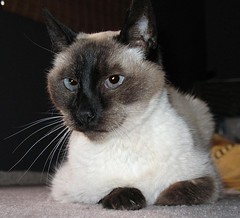
Izumi, 1991-2009

Izumi, my cat and longtime companion, died today at the age of 18. It was a peaceful death, brought on by old age and steadily deteriorating health due to hyperthyrodism.

Izumi joined my family in 1991 while I was attending college at UC San Diego. He was the only cat I'd ever known who liked to follow me around. I understand that's a common characteristic of Siamese cats. Always present, always just beyond arm's reach. He'd even go on walks around the apartment complex, always a few steps behind, sniffing the bushes and going up to all the doors. He loved watching the neighbors go to work in the morning and come home in the evening, keeping an eye on them from atop the stairs leading to the second floor apartments.

When we moved to Davis, California, in 1995 he came with us and was soon joined by three other cats: Stripe, Oreo, and Isaac (all siblings) in 1997. (Isaac passed away in January, 2006.)

I fondly remember living in a two-story condo in San Diego. Izumi loved playing on the stairs. I'd play hide-and-seek with him. He'd run up the stairs, stop at the top, and look back toward me. But I'd be hiding around the corner at the bottom. Soon, Izumi would be back at the bottom of the stairs to find out where I went. When I emerged, he'd let out a joyful "meow!" and dash back up the stairs. This play would repeat a dozen times before we both got tired.

In some ways, I bought the house I'm in now for Izumi. Having lived in a one-story house for the past eight years, I wanted him to re-live those stair-climbing days. And that he did, for a while, until he started showing symptoms of his declining health. The last few months have been particularly difficult and he was put to sleep this morning.

Izumi is survived by my two remaining cats: Stripe and Oreo. May they live to be as old, wise, and worldly as Izumi.

Thursday, December 25, 2008

Comcast Summary

Some of you readers wanted to know what became of the Comcast saga. I thought I had made it clear in the last post of the series, but upon reading it I see that I did not. Here's what my setup is now:

$12.95 for Basic Cable (channels 2-13, essentially)
$1.79 for two CableCards

The CableCards give me the HD channels 902-913 for "free." I don't have to pay the $8.00 fee to receive them.

I'm very happy with this arrangement. I did buy an outdoor HD antenna and briefly tried it out. It received the stations well, but I was worried about the trees that obscured the line-of-sight to the transmitters about 40 miles away. I ended up returning the antenna and sticking with cable.

A friend has encouraged me to try the antenna again and ditch cable entirely. I may do that when I get the time. That will save roughly $15/month.

Monday, October 13, 2008

Printer resolution, demystified

Someone wrote to me with a question about printing getting a digital photo printed in a magazine:

Attached is a photo that blows up very well on screen. However, I keep getting told by journal publishers that they need them with more pixels. Can it really be so that sufficient resolution on screen will not turn out to be sufficient resolution when printed (in the same or even smaller size)?

Attached was a 1700x1200 pixel image.

My reply:

You should give print publishers the largest possible image size so they have the flexibility to reduce or enlarge it as needed.

Let's see if I can explain it.

Every output device, such as a monitor or printer, has a native pixel density, called pixels per inch, or PPI, and also incorrectly referred to as dots per inch (DPI). A monitor is typically somewhere around 75-100 PPI. A printer's PPI will be stated by the manufacturer; for example, 600 ppi or 1200 ppi.

Let's take a 600ppi printer as an example. A resolution of 600ppi means the printer prints 600 pixels per inch in each direction. Each square inch of paper is filled with 600x600 little droplets of ink.

If you take a photo that's 1000x800 pixels and print it at the printer's native resolution, how big will it be?

It will be 1000/600 inches by 800/600 inches, or about 1.7x1.3 inches. Each pixel in the image becomes a tiny droplet of ink on the paper. That size is fine for a postage stamp or a business card, but what if you want to print a 4x6 inch picture?

A 4x6 picture would need 4x600=2400 pixels in one dimension and 6x600=3600 pixels in the other: a 3600x2400 pixel image. In other words, in order to print out a 4x6 image so it appears the sharpest and most detailed on the printer, you need to send it an image that's 3600x2400 pixels.

"But!" you protest. "3600x2400 is 8.6 megapixels. That's more than my digital camera has. You mean my $1500 digital SLR can only print small 4x6 photos? How can I print out anything bigger than about a 4x6 image if my camera's sensor doesn't have that many pixels?"

Well, here's where you can fudge things a bit. The calculations are still fundamentally the same, but things get a little blurry, literally.

The human eye simply can't see anything as detailed as 600ppi. There aren't enough rods and cones in the eye to do it. So although the printer is capable of printing 600 pixels per inch, only about 300-400 of them are actually visible.

Couple that with limitations in print technology itself. You know from personal experience that when you touch ink to paper (say, when you a black marker), the ink spreads a little. It's no different in an inkjet printer. The printer may be spitting out 600 little droplets of ink for every inch, but they smear together such that the effective resolution of the printer is around 250-450 ppi, depending on the paper and ink being used.

Let's settle on 300ppi as a nice average of both eye resolution and printer resolution and rework the previous example.

A 4x6 print at 300dpi is 1200x1800 pixels. In other words, you can print out a 1200x1800 pixel image at 300ppi and it will look pretty much the same as the 600ppi image. But you can't get away from the native resolution of the printer. The printer can't actually print anything at 300ppi. So here's what actually happens:
  1. You direct the computer to print the 1200x1800 image, scaled to fit 4x6 inches. The computer calculates that to be 300 ppi.

  2. The printer driver takes the 1200x1800 image and scales it up to 2400x3600 by doubling each pixel in both directions. The image is now scaled to the printer's native resolution.

  3. The printer prints the 2400x3600 image. It occupies 4x6 inches of paper. It comes out looking pretty good.
Let's say now you take that same 1200x1800 image and direct the computer to make an 8x12 inch print out of it. What will happen?
  1. The computer calculates the resolution to be 150ppi.

  2. The printer driver scales up the image to the printer's native resolution of 600dpi by quadrupling each pixel in each direction. The image is now 4800x7200 pixels.

  3. The printer prints the 4800x7200 pixel image onto an 8x12 inch print.
But what does the print look like? Is it sharper, blurrier, or the same as the 4x6 print? A: at only 150ppi, it's blurrier than the 4x6 print because the same 1200x1800 pixels now effectively occupy a larger area. Each pixel had to be printed bigger to fill the area, so it appears less sharp.

Do you see what's happening here? An 800x600 pixel image looks great on your monitor displayed as a roughly 8x6 inch image on the screen, whose native resolution is around 100ppi. The image is as sharp as it's going to be on the monitor, so you think "Wow! I'm going to print this out!" Although it would look great printed as a 2.6x2 inch print (300ppi), it would look lousy printed as a 4x6 print (133ppi) and really crappy as an 8x12 (66ppi).

So back to your magazine publisher. Let's say they want to print your flower picture as a 4x6 in the magazine. Let's also assume they have a really high quality printer with good, glossy paper whose effective resolution is 400ppi. How many pixels should your image be to make the publisher happy?

4x400=1600, 6x400=2400. Your image should be at least 1600x2400 pixels. More pixels would give the publisher some flexibility, since it would allow them to print the photo larger without having to reduce the pixel density. Scale your image to at least 1600x2400 pixels. Don't worry about PPI or DPI; just give the magazine an image at least 1600x2400 pixels.

Here are some common rule-of-thumb output resolutions:

75-100 ppi: screen
200: fax machine
300: ca. 1990 B&W laser printer
300: effective resolution of a consumer inket printer
350-400: limit of human eye
400: Costco 1-hour photo
400-450: high-quality offset color printing press
600: modern B&W laser printer

Hope that helps!